Introduction
Being online for local businesses is no longer just about having a website or social media presence. Increasingly, customers are searching Google for a local shop, clinic, restaurant, service provider, or other business. Google Business Profile is often a prominent feature when a user searches for a “near me” business.
An optimized Google Business Profile can help customers discover your business, view your location, read reviews, view images, get directions, make a call, and browse your website. Google says providing accurate and up-to-date information can help customers learn about what you do, where you are, and when you are open. Google also considers relevance, distance, and prominence when ranking local businesses.
What is Google Business Profile?
Google Business Profile is a free platform for businesses to control their appearance on Google Search and Google Maps. It displays key information about your business – name, address, phone number, website, business hours, images, reviews, services, products, and announcements.
This profile serves as an online shop window for local businesses. A lot of people will browse your Google profile before they come to your store or contact your staff. When the data is accurate, up-to-date, and reliable, they’re more likely to act.
The Importance of Google Business Profile Optimization
Just listing the profile is not sufficient. Your business profile should be set up to provide relevant information to both users and Google.
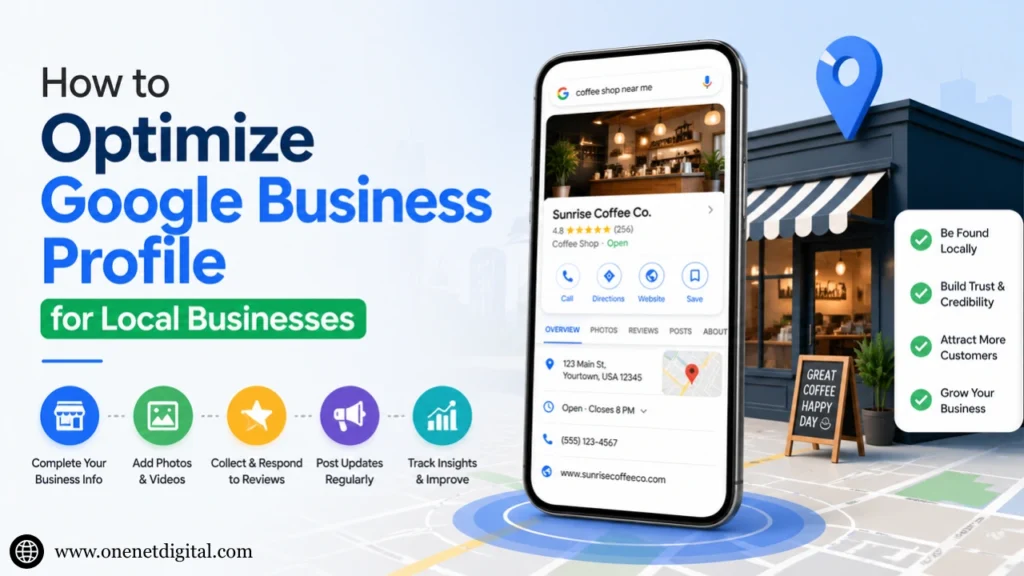
A well-optimized profile can help your business:
- Be found in local search results.
- Build trust with potential customers.
- Get more clicks, visits, and calls.
- Display your services, products, and images.
- Manage reviews
- Post news, promotions, and events
Google also suggests that you ensure that the information you provide is accurate and complete because incomplete or inaccurate information can impact your profile’s display of listings for local searches.
1. Enter Correct and Complete Business Information
The first thing you can do is fill in all the critical sections. This includes your business name, address, phone number, website, business hours, category, and service area.
Your business name should be your real name. Don’t include additional keywords in your business name if they are not part of your name. Google guidelines state your business name must reflect your actual name on your shopfront, website, business cards, and how customers know your business.
Make sure you update:
- Business name
- Business category
- Address or service area
- Phone number
- Website link
- Opening and closing hours
- Holiday hours
- Products and services
- Business description
It is important that you keep your business’s phone number, address, and opening hours up-to-date. Google provides verified businesses the ability to change their address, hours of operation, phone number, and pictures.
2. Select the Right Business Category
The category tells Google what kind of business you are. Select the most relevant main category. For instance, if you are a dental clinic, do not select the category “Health Service” if “Dentist” is an option.
You can also select additional categories, but only if they are relevant. Don’t, however, add extraneous categories for higher visibility. Quality is more important than quantity.
3. Create a Business Description
Your business description should describe who you are, what you do, and for whom. Be straightforward and natural. Don’t keyword-stuff. Rather, focus on communicating your business in an easy-to-understand manner.
Your business description can include:
- Your main services
- Your target customers
- Your service area
- What are you good at
- How your business benefits customers
For instance, rather than “best digital marketing agency,” it’s better to describe your services, location, and benefits to customers in a natural way.
4. Include Good Quality Photos and Videos
Images help customers get to know your business before they visit or make an appointment. According to Google, business owners can upload photos and videos of their storefront, products, and services, and photos of the exterior of the business can help customers identify your business when they arrive.
You can add photos such as:
- Store or office exterior
- Interior photos
- Team photos
- Product photos
- Service-related images
- Before-and-after work
- Menu or catalog images
- Work environment
Use real and clear images. Don’t use poor-quality, deceptive photos or images. Posting new photos regularly can help your page appear more authentic.
5. Gather and Respond to Reviews
Customer reviews are a critical trust factor for local businesses. Customers often read reviews to find a service provider. Good reviews can increase the trust of a prospective customer.
Encourage satisfied customers to write reviews. Avoid fake reviews or promotions against service policies. And, respond to reviews. Respond to positive reviews and acknowledge negative reviews.
Thanking customers for positive reviews and politely responding to negative reviews can demonstrate to potential customers that you value customer service.
6. Use Google Business Profile Posts
Google Business Profile posts are a way to share news, offers, events, and other business news. According to Google, posts can help customers view your updates on Search and Maps.
You can post about:
- New services
- Special offers
- Business updates
- Events
- Seasonal promotions
- Product launches
- Helpful tips
- Holiday timings
Post content should be brief, informative, and helpful. Include a call-to-action, if necessary, such as “Call now”, “Learn more”, “Book appointment”, or “Visit website”.
7. Add Products and Services
If you provide products or services, list them on your profile. It allows users to get a quick overview of what you offer.
For example:
- A beauty salon can add haircut, facial, bridal makeup, and hair treatment services.
- A restaurant can add menu items or popular dishes.
- A digital marketing agency can add services such as social media marketing, Google Ads, website design and development, and SEO.
- A business can add medical consultation, treatment, and booking services.
This should be a short description. Avoid long descriptions. Use terms that people use.
8. Ensure You Use Consistent NAP Information
NAP stands for Name, Address, Phone number. It’s important that the details on your website, Google profile, social media profiles, and directories all match.
For example, if your website lists one phone number and your Google profile lists a different phone number, this can be confusing. It can also make people not trust you.
To improve local visibility, be consistent with your business name, address format, phone number, and website URL.
9. Track Performance Regularly
Google Business Profile also offers performance reports. You can see how people are finding and engaging with your profile. Google’s performance section enables you to view profile activity for a chosen timeframe.
You can monitor:
- Calls
- Website clicks
- Direction requests
- Profile views
- Search terms
- Customer actions
This information tells you what’s working. If you have a high number of people requesting directions, your location may be well known. If few are clicking through to your website, you may need to promote more valuable information on your profile.
Common Mistakes to Avoid
Local business owners create a profile, but do not keep it up-to-date. Avoid these mistakes:
- Using an incorrect business name
- Including keyword stuffing in the business name
- Not updating business hours.
- Ignoring customer reviews
- Uploading low-quality photos
- Selecting the incorrect category
- Not adding services or products.
- Not using the same phone number.
- Not sharing regular updates.
- Not completing the profile.
Google Business Profile is not a set-and-forget platform. It requires ongoing maintenance and attention.
Final Thoughts
Optimizing your Google Business Profile is one of the most valuable things local businesses can do to increase their visibility, phone calls, website traffic, and trustworthiness. It allows customers to find your business more easily when they are looking for products or services in your area.
Getting the basics right is essential: fill out your profile, select the right category, include up-to-date contact information, add authentic photos, encourage reviews, and post updates. As you refine your profile, it will become more useful and enticing to customers.
To get the most from your Google Business Profile, link it to your website, local SEO, social media, and content marketing efforts. This helps increase your online presence and ensures local customers find the information they need, when they need it.