
Introduction
The structure of a website greatly influences how visitors and search engines treat its content. Even if your website has great articles, product pages or services, poor organization can make it difficult for users to find what they’re looking for. Search engines also require a clear structure to understand how different pages relate to each other and which content is most important.
A good site structure isn’t just about ranking better; it’s also about making your website easier to navigate. A well-planned structure will allow users to easily navigate between pages, keep visitors engaged and allow search engines to crawl your content more efficiently. Whether you run a small blog, an online shop or a business website, a proper organization of your pages can make a significant difference in the long-term performance.
What is a Site Architecture?
Site structure refers to the arrangement of webpages and the way they are connected through menus, categories and internal links. It serves as a map to help visitors understand where they are and how to navigate to other pages on the website.
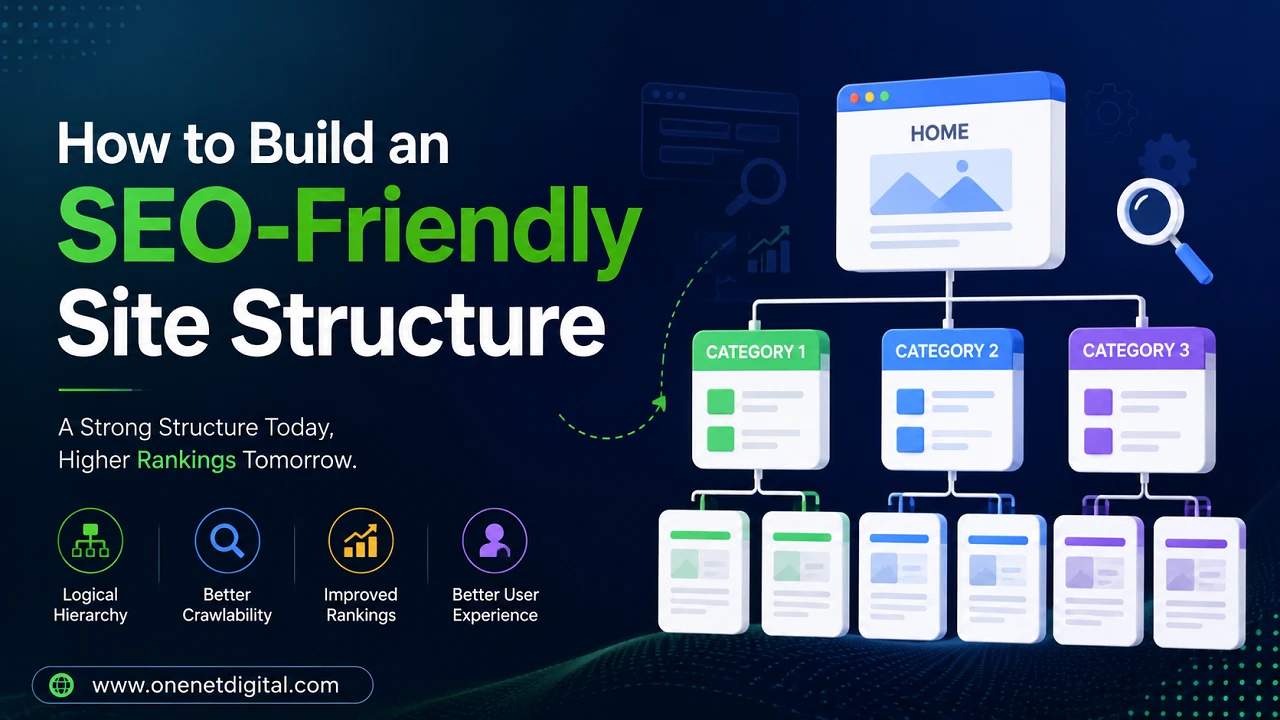
A good structure generally starts with the homepage, then major categories, subcategories and individual pages. This hierarchy creates a logical flow, which is good for users and search engines. If each page has a set place on the website, then navigation is made much easier.
Why Site Structure is Important for SEO
Internal links assist search engines in discovering pages and understanding the relationship between various parts of a website. A well-structured site will help search engine crawlers to crawl the important pages quickly and easily and waste less time crawling on unnecessary paths.
The website’s organization also helps visitors. The easier it is to find information, the more likely are visitors to stay longer, visit related pages and complete the desired actions. On the other hand, a confusing website leads to frustration and higher bounce rates.
A strong base will make it easier to deal with future content while allowing for consistent SEO growth.
Also Read: How to Fix Orphan Pages on Your Website | One Net Digital
Begin With a Clear Website Structure
On every website there should be a simple, logical hierarchy. Links to the main categories should be on the homepage and each category should contain links to related pages or articles.
Don’t add unnecessary layers that require users to click through multiple pages before they can find important information. The simpler the hierarchy, the easier it is to navigate and the easier it is for search engines to crawl.
It can save you a lot of headaches later on when it comes to organising your website if you think about the structure of your website before you publish a lot of content.
Organize Content into Relevant Categories
With categories, you can easily find things on a website that are related to each other.
For instance, a website dedicated to digital marketing could have individual categories like SEO, content marketing, social media, and email marketing. Related articles within each category should be supportive of the same subject.
Do not create too many categories with one or two pages. Instead, build meaningful sections that allow users to discover related content naturally.
Make Easy-to-Understand URLs
Websites should have URLs that accurately reflect the page they represent. Short, readable URLs are easier for visitors to remember and give search engines useful context. This makes the website structure clean.
If you consistently format your URLs, it will be easier to manage your website as your content grows.
Develop a Strong Internal Link Strategy
Related pages on your website are connected by internal linking. These links help visitors find more information and help the search engines navigate your content.
When you post a new article, look for chances to link it to existing pages on similar topics. Update older content by adding links to newer resources where appropriate.
Natural internal linking helps reinforce your website structure without making the content feel forced.
Also Read: ChatGPT and SEO: What Businesses Should Know about AI Content and Ranking
Make Navigation Simple
Your navigation menu should allow visitors to quickly find important sections.
Don’t fill the menu with too many items that overwhelm users. Rather, only the most important categories and pages that best represent the main content of your site should be included.
If you have a lot of pages on your website, try using dropdown menus or well-organized category pages rather than putting everything in the main navigation.
The simple navigation makes it faster for visitors to find information and provides a better user experience.
Make All Important Pages Easy to Find
Do not hide important pages deep within the site.
Users and search engines should be able to find valuable content within a few clicks from the homepage wherever possible. Pages that are hard to access often get less attention and may not perform as well.
Make sure important content is still linked through categories, navigation and internal links, so check your website often.
Use Breadcrumbs Navigation
Breadcrumb navigation displays the path visitors took to arrive at the current page.
For instance, breadcrumb links make it easy for a user to return to the category or homepage of a blog article. This improves the navigation while assisting search engines in understanding your website hierarchy.
Breadcrumbs are especially helpful for larger websites with lots of categories and subcategories.
Create a Balanced Internal Linking Structure
Make sure you have internal links from relevant sections on every important page of your website.
Make sure links are spread out over several pages and not concentrated on a few pages. A well-structured linking structure helps improve page discovery and distribute authority throughout your site.
Regularly review older content to ensure that valuable pages continue to receive relevant internal links over time.
Remove Unneeded Pages
Websites expand and older pages tend to stay online, even if they no longer serve a purpose.
Audit your content on a regular basis and decide which pages to keep, update, redirect or delete. Only useful content remains, which leads to a cleaner website structure and better navigation.
It also removes confusion for visitors and search engines by removing unnecessary pages.
Also Read: Digital Marketing Trends Businesses Should Follow in 2026
Regularly Check and Update Your Structure
A website is never truly finished. As you publish new articles or add services, your structure should keep evolving.
Regular website audits can help identify navigation issues, broken links, duplicate categories, and other issues that can affect user experience.
It’s often better to make small changes over time than wait for major redesigns.
Common Mistakes to Avoid
Many website owners make the mistake of creating too many categories and it makes navigation confusing. Others do post new content but fail to add internal links, making it more difficult to get to your valuable pages.
A common mistake is to create long complicated URLs that tell you very little about the page.
Over time, not updating old pages can also degrade your website structure. These issues can be avoided through regular maintenance and your website will stay organized.
Summary
Everyone wins with a well-organized website. It’s easier for visitors to find information, and easier for search engines to crawl and understand your content. Building a logical hierarchy, useful categories, strong internal links and reviewing your website regularly will all help to build a stronger online presence.
Building an SEO-friendly site structure is not a one-and-done task, but an ongoing process. As your website expands, optimizing its organization can help you in the long run with better user experience, better SEO performance, and easier content management.
FAQs
1. What is a structure for a site that is good for SEO?
It’s a nice organized website layout which makes it easy for users to navigate, and at the same time it allows search engines to crawl and understand the content better.
2. Why is the structure of a site important for SEO?
A clear structure makes pages easier to discover, aids better internal linking, improves the user experience and helps search engines understand the relationship between different pages.
3. How many clicks should important pages take?
The usability and crawlability are improved, if important pages can be ideally reached within two or three clicks from the homepage.
4. Do internal links help out site structure?
Yes, Internal links are links between your own pages. They can help with navigation and help search engines find and understand your content better.
5. How often should I review my site structure?
It’s a good idea to review your website every few months, or if you add significant new content, to keep your structure organized and SEO-friendly.
